

InVision CS2 Web Radar: Real-Time Counter-Strike 2 Radar Hack

What is the InVision Web Radar?
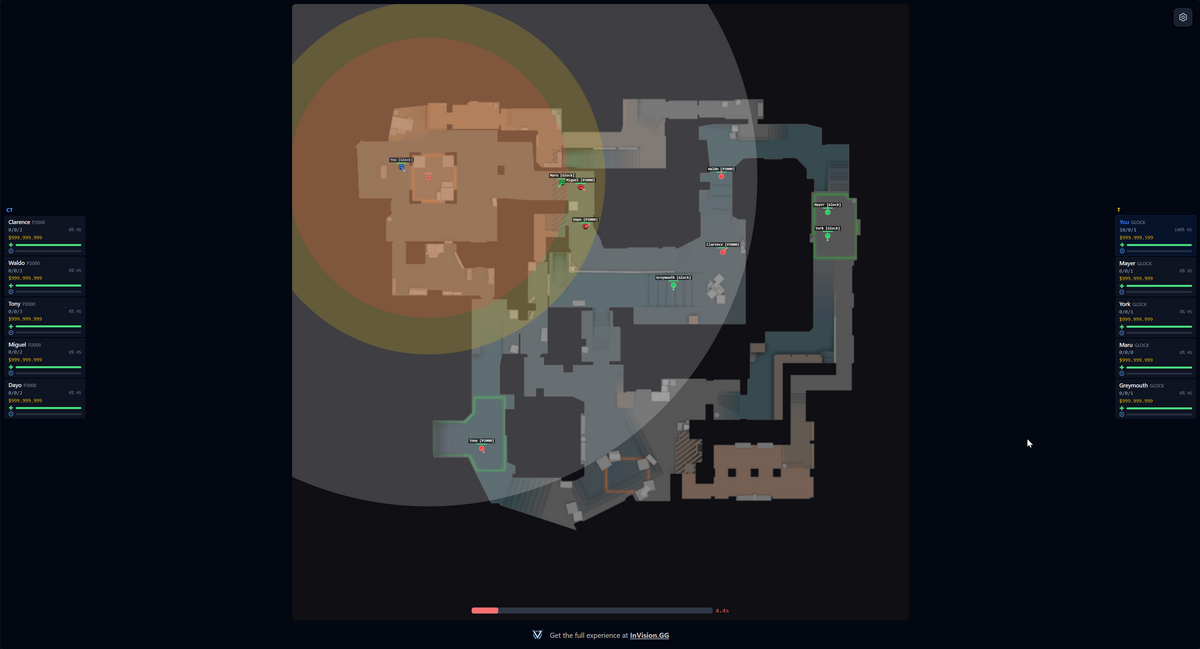
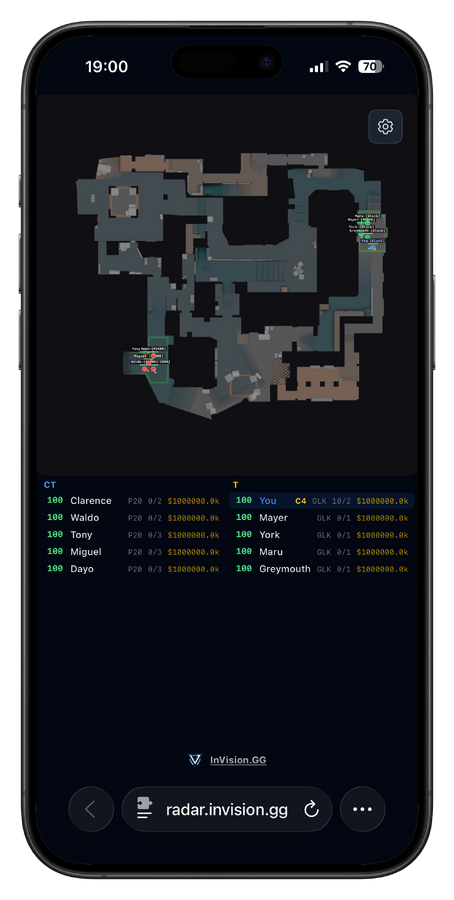
The InVision Web Radar streams a live 2D overview of your match to any browser. Simply copy your unique session link and share it with your squad. They can view the live feed of everything that is happening within the match on a phone, tablet, second monitor, or the Steam overlay. No software to install, no accounts to create. If they have a browser, they have a radar.
Once enabled, our cheat generates a secure, shareable URL that anyone in your group can use. The radar updates in real time, broadcasting player positions, bomb status, utility, and dropped weapons. Give your entire team full map awareness, even if only one person is running the InVision CS2 cheat.
Key Features
Live Player Tracking
Track every player on the server with zero delay. The data includes:
- Position and facing direction: See enemy locations and their exact line of sight
- Health and armor: Monitor health and armor to identify weak targets
- Active weapon: Identify your enemies' active weapons and understand what you are up against
- Economy and scoreboard info: Track team wealth, loss bonuses, and live K/D/A stats to predict enemy buys
Objective & Utility Data
The web radar goes beyond player dots. It provides a complete tactical overview and also tracks:
- Bomb position: Track the bomb's status, whether carried, planted, or dropped
- Bomb radius: See the exact explosion radius to know who survives
- Live utility: See Smokes, Flashes, HEs, and Molotovs, including the exact area covered by smoke and fire
- Dropped weapons: Locate dropped weapons and check remaining ammo counts
One-Click Squad Sharing
The best part of the web radar is how easy it is to share. Hit the Copy URL button, paste the link into your Discord or group chat, and everyone in your squad has a live radar on their screen within seconds. Your friends do not need to download anything, create an account, or configure a single setting. They just click and watch. Whether it is a five-stack or a friend spectating from across the country, everyone gets the same real-time view.
How to Set It Up for Your Squad
- Open the CS2 cheat menu
- Navigate to the Misc tab
- Toggle Enable Web Radar
- Wait for the status to change to "Radar Active"
- Click Copy URL and send the link to your friends
That is it! Your squad is live the moment they click the link.
Frequently Asked Questions
Does the web radar affect FPS?
No. The web radar runs on a dedicated thread and piggybacks on existing entity caches. By sending lightweight packets to our backend, the performance impact remains negligible, ensuring your frames stay high while your data stays accurate.
Can my friends see the radar without the cheat?
Yes! That is the main idea behind the web radar and its core advantage. Anyone with the session URL can view the live radar in any browser. Send the link to your entire friend group so they can all see the same real-time map. It is perfect for an IGL calling from their phone, teammates using a second monitor, or even someone spectating your game from across the world. They do not need to use the CS2 cheat themselves or have any other software installed.
How do I use the Web Radar in the Steam Overlay?
The following video describes the process of setting up the web radar using the "pinned" feature in the Steam overlay.
How much bandwidth does it use?
At a 25ms interval, it uses approximately 0.7 Mbps of upload bandwidth. You can adjust the update interval in the settings to reduce upload usage if needed.
Is the session URL secure?
Each session uses a unique, randomized ID. The data is only accessible via that specific link. Once you disable the radar in your menu, the session terminates and the link becomes inactive.
Get Started
The web radar is now available in our CS2 cheat. Enable it in the Misc tab and give your squad an instant advantage. No downloads, no extra software, just one link and a browser.